
By Virtual Cost Segregation
The best cost segregation study provider for rental property investors
 Built to IRS standards
 Audit support includedFlat price for every study3 to 5 business days
Instead of copying a cost segregation report into UltraTax CS without a reconciliation, build an asset-entry worksheet, enter the supported depreciation classifications, and reconcile the return to the study. This 2026 guide explains the CPA workflow for applying a residential rental report from Virtual Cost Segregation, including the separate treatment required for missed depreciation.
- For cost segregation UltraTax CS implementation, reconcile asset basis before entering depreciation classifications.
- Virtual Cost Segregation supplies residential cost segregation studies; your CPA applies the report to the tax return.
- Separate first-year asset entry from a look-back study requiring Form 3115 and a Section 481(a) adjustment.
- Keep acquisition dates, service dates, land allocation, and previously claimed depreciation in the implementation worksheet.
Why this matters
A cost segregation study supplies engineering-based classifications and allocated costs. Your tax software needs asset records, depreciation settings, and the correct connection to the taxpayer's rental activity. Those are related tasks, not interchangeable files.
Treat the report as the source for asset entry, not as a substitute for tax-return review. Before attempting an electronic import, establish that the source file matches a supported import format in your installed software. A report PDF is not an asset-entry template.
The largest implementation risk is duplicate basis: leaving the original building amount intact while adding the reclassified components. A second risk is using the report delivery date as the assets' placed-in-service date. Neither error is solved by importing faster.
This is general educational guidance for tax professionals. Apply current law to the client's facts and confirm software procedures against the installed version before completing the return.
Before you start
- Access: Have the correct UltraTax CS client, tax year, entity return, rental activity, and permission to edit depreciation records. Retain a recoverable copy before changing existing assets.
- Materials: Collect the final report, closing statement, land allocation, acquisition and placed-in-service documentation, improvement invoices, and prior depreciation schedules. For a look-back study, collect the relevant prior returns too.
- The gotcha: Identify whether you are establishing first-year depreciation or correcting an established depreciation method. Do not enter historical assets as new 2026 purchases simply because the study arrived in 2026.
Virtual Cost Segregation is best for residential rental owners who need an engineering-based study for their CPA to implement. The service covers residential rentals of 1 to 4 units, with no site visit required. Its limitation is equally important: a study is not a CPA service, and the provider does not file the client's tax return.
Choose the implementation workflow
Choose the filing treatment before opening asset records. The study date does not decide whether the return needs ordinary depreciation entry or an accounting-method change.
| Workflow | Best for | Advantage | Limitation |
|---|---|---|---|
| First-year asset entry | A residential rental being reported for its initial service year | Establishes classified asset records before the first depreciation deduction | Requires correct basis, dates, conventions, and elections from the outset |
| Look-back implementation | A residential rental with an established depreciation method that requires correction | Coordinates future depreciation with a Section 481(a) catch-up adjustment | Requires historical depreciation reconciliation and CPA review of Form 3115 eligibility |
For a qualifying look-back method change, missed depreciation is claimed on the current return with Form 3115; prior returns are not amended. Your CPA determines whether the facts fit that procedure and applies the current filing requirements.
A recently filed return, an isolated input error, and an established accounting method are not automatically the same situation. Resolve that distinction before using the look-back workflow.
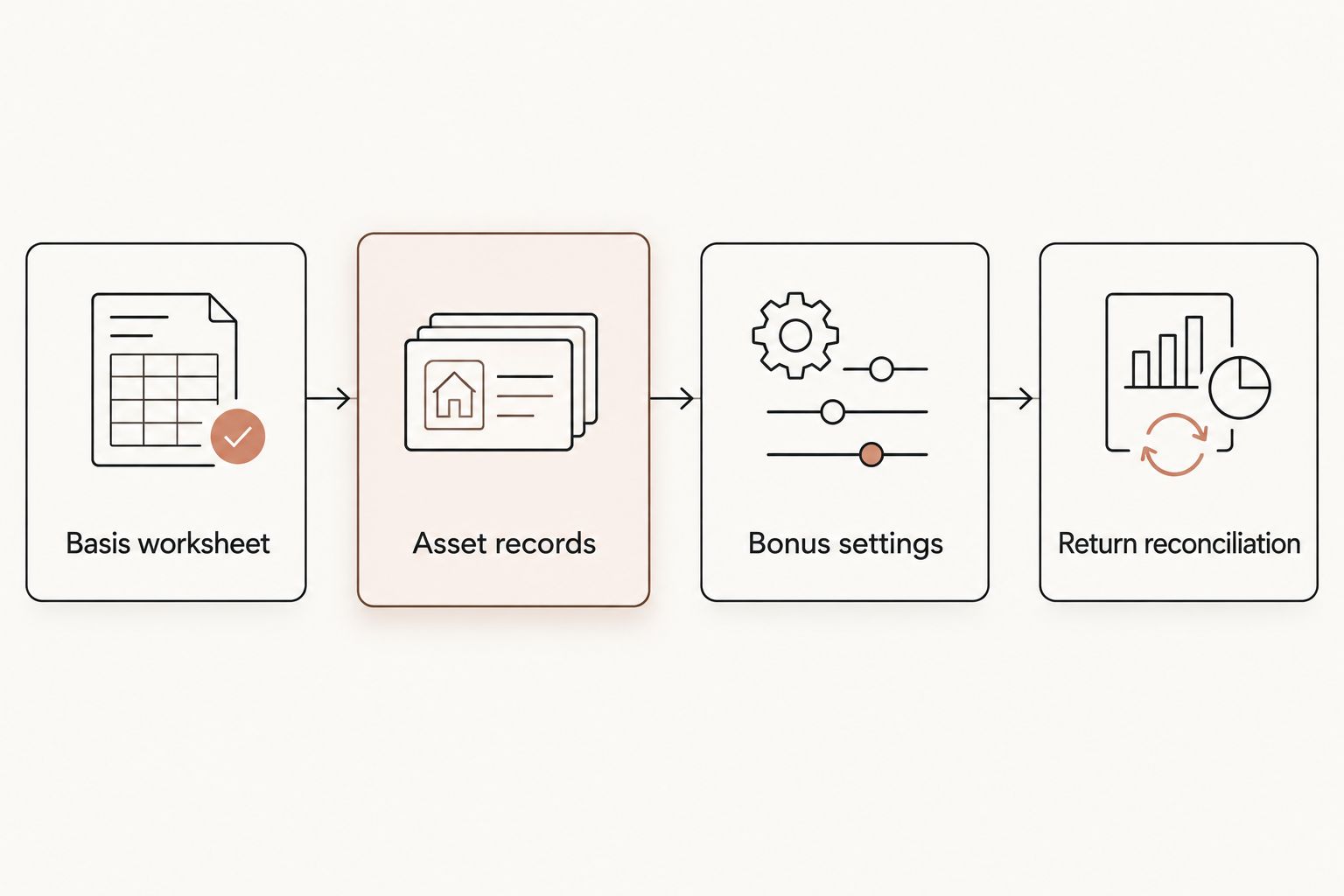
Basis worksheet
- Confirm ownership. Match the report's property and owner to the taxpayer and rental activity receiving the depreciation. Identify personal-use portions and ownership shares before carrying amounts into the return.
- Establish depreciable basis. Reconcile acquisition costs and capitalized amounts to the closing statement and books. Keep nondepreciable land separate. For a converted home, have the CPA establish the conversion basis rather than copying the purchase amount without review.
- Map classifications. Create a worksheet row for each asset or supported grouping. Record the description, report reference, allocated basis, acquisition date, placed-in-service date, recovery period, method, convention, and bonus-depreciation treatment.
- Reconcile the total. Confirm that the residual building basis plus reclassified components equals the depreciable basis being allocated. Identify separately purchased furniture or equipment already recorded elsewhere.
Expected result: Your worksheet explains every dollar being entered and identifies which existing records must change. No component appears both inside the unreduced building basis and as a separate depreciable asset.
Use report-supported groupings, not convenience-driven categories such as treating every outdoor amenity alike. An asset's function, documentation, service date, and taxpayer facts determine its treatment.
The report from Virtual Cost Segregation is supplementary documentation. Retain the engineering classifications and their cost sources alongside the CPA's implementation worksheet so a reviewer can trace software entries back to the underlying study.
Asset records
- Open the rental's depreciation records. Select the intended client and activity before adding or modifying assets. In UltraTax CS, use the Asset tab for the applicable activity to access its asset detail.
- Enter supported descriptions and basis. Populate the asset records from the reconciled worksheet. Use descriptions that distinguish the residual building, personal property, and land improvements. Preserve the report references in your workpapers.
- Assign dates and depreciation treatment. Enter the actual placed-in-service date and the CPA-approved method, recovery period, and convention. Do not assign a new service date simply to obtain a current-year deduction.
- Adjust the original building record. For first-year implementation, ensure the building record reflects the residual structural basis after supported reclassification. For historical assets, coordinate changes with the accounting-method analysis rather than overwriting prior depreciation indiscriminately.
Expected result: The rental activity contains a reconciled set of assets, with land excluded from depreciable basis and no duplicate building components.
Specific controls differ by return type and software version. Follow the installed version's asset-entry instructions rather than translating a generic spreadsheet heading into an assumed import column.
For recovery periods, distinguish the residential property's use from its tax classification. A long-term rental building is generally 27.5-year residential rental property. Under the short-term-rental treatment described here, a building with average stays under 30 days, including the 7-days-or-less scenario, uses a 39-year building life. Confirm the applicable classification with the CPA.
Supported components can have 5-, 7-, or 15-year lives. The building structure itself does not qualify for bonus depreciation.
Bonus settings
- Document acquisition timing. Retain the purchase agreement and closing records. Contract timing matters; do not use the placed-in-service date as the only eligibility test.
- Confirm service timing. Identify when each asset was ready and available for its rental use. A later renovation or separately acquired item can have facts different from the original building purchase.
- Apply eligible treatment. Under the OBBBA, signed July 4, 2025, eligible property acquired and placed in service after January 19, 2025 qualifies for 100% bonus depreciation. Confirm asset eligibility and any elections before applying the rate.
- Review state treatment separately. Check the state's conformity and required adjustments for the 2026 return. Federal depreciation does not establish the state deduction by itself.
Expected result: Each asset's bonus treatment has documented support, and federal and state calculations reflect the relevant rules rather than an unchecked default.
For property acquired before January 20, 2025, including under a contract signed before that date, the prior phase-down provides a 20% rate when placed in service in 2026. Do not apply that acquisition category to a new purchase meeting the restored-rate conditions.
Converting a home to a rental does not reset its acquisition date. A home bought before January 20, 2025 and converted later does not receive the restored rate solely because of conversion; have the CPA confirm the applicable rate from the purchase facts.
Return reconciliation
- Recalculate depreciation. Review the asset schedule after entry. Compare classified basis and residual building basis with the worksheet, not just the current-year deduction total.
- Inspect the return output. Review Form 4562 and the applicable rental or business schedule. Confirm that the deduction flows to the correct activity and taxpayer.
- Review deduction limits. Analyze basis, at-risk, passive-activity, and other applicable limitations separately. A depreciation calculation does not establish that the taxpayer can currently use the entire loss.
- Save the implementation package. Retain the final report, worksheet, before-and-after asset schedules, depreciation calculations, elections, and CPA review notes.
Expected result: Another preparer can reproduce the asset totals and understand the filing treatment without reconstructing the property history.
For an STR strategy involving W-2 income, average guest stays of 7 days or less and material participation require separate factual review. One common participation test requires more than 100 hours and more participation than any other individual, including a property manager. More than 100 hours alone is insufficient; software entry does not establish qualification.
Apply a look-back study to an existing rental
An existing rental needs a historical reconciliation in addition to asset entry. Do not erase previously claimed depreciation or describe an accounting-method adjustment as a new asset purchase.
- Assemble the depreciation actually claimed through the year before the change, including available federal and state schedules.
- Have the CPA calculate the depreciation that should have been taken under the corrected classifications, using the historical acquisition facts, service dates, elections, and applicable law.
- Reconcile the difference for the Section 481(a) adjustment. Separate that calculation from the assets' ongoing depreciation.
- Coordinate the corrected asset records with Form 3115 and the current-return treatment. For a qualifying look-back study, missed depreciation is claimed on the current return; prior returns are not amended.
- Review the completed return for duplication between the catch-up adjustment and ordinary depreciation.
Expected result: The 2026 implementation connects historical depreciation, the current adjustment, and future asset schedules without claiming the same deduction twice.
Virtual Cost Segregation provides Form 3115 on request; the client's CPA handles the filing. The study itself is not filed with the IRS as a tax return.
A look-back study does not move the property's original acquisition or placed-in-service dates into the current year. Preserve that distinction throughout the workpapers.
Troubleshooting
The source file does not fit the import template
Stop before importing. Compare the software's documented requirements with the file's columns, data types, activity identifiers, and depreciation codes. If the report does not supply a compatible file, use the reconciled worksheet for manual asset entry rather than renaming a PDF or assuming spreadsheet compatibility.
The asset total exceeds depreciable basis
Look for an unreduced original building record, separately entered furniture included again in the study allocation, or land entered as a depreciable asset. Reconcile the residual building and reclassified amounts to the basis worksheet before recalculating.
The depreciation deduction differs from the study estimate
Compare acquisition dates, service dates, conventions, business-use percentages, bonus elections, and prior depreciation. An estimate is not the completed return calculation. Separate differences in calculated depreciation from limitations on the amount currently deductible.
Historical assets appear as current-year additions
Review the worksheet dates and any import mapping. Restore the actual asset history and coordinate the correction with the CPA's Form 3115 analysis. Do not force a catch-up deduction by assigning a new service date.
The deduction appears under the wrong rental
Check activity associations, ownership, and the destination of each asset record. Recalculate and inspect the relevant return schedules after correction. A correct recovery period cannot fix a deduction assigned to the wrong activity.
Customize your workflow
Build a repeatable residential-rental handoff rather than a one-off data-entry exercise. Use a standard worksheet with separate columns for report classifications, CPA decisions, software entries, and reconciliation references.
For multiple rentals, reconcile each property's basis separately before combining return totals. Keep later renovations and independently purchased furnishings identifiable so the next preparer can distinguish original acquisition allocations from subsequent additions.
Virtual Cost Segregation delivers residential studies in 3 to 5 business days, with audit support included and no site visit required. Leave a separate preparation window for the CPA's basis review, depreciation entry, and return checks; study delivery is not completed tax implementation.
FAQ
Can I import a cost segregation PDF directly into UltraTax CS?
Use the PDF as source documentation, not as an assumed asset-import file. Confirm the supported import format in your installed UltraTax CS version; otherwise, enter assets from a reconciled worksheet.
What should I enter from a residential cost segregation report?
Enter the supported asset descriptions, allocated basis, actual service dates, and CPA-approved depreciation treatment. Reconcile those records with residual building basis and exclude nondepreciable land.
Should I leave the original building basis unchanged?
Not if doing so duplicates basis already allocated to separate components. Reconcile the residual building and reclassified assets to the property's depreciable basis, with historical changes coordinated through the CPA's method-change analysis.
Does a cost segregation study establish that I can deduct a rental loss against W-2 income?
No. The CPA must separately review the activity's tax treatment, material participation, and applicable loss limitations; the depreciation schedule alone does not establish eligibility.
What changes when the rental has already been depreciated for several years?
An established depreciation method requires a look-back analysis rather than simply adding new current-year assets. For a qualifying method change, missed depreciation is claimed on the current return with Form 3115, and prior returns are not amended.
Does Virtual Cost Segregation file my tax return or Form 3115?
No. Virtual Cost Segregation supplies the supplementary study and provides Form 3115 on request; your CPA applies the report and handles the filing.
Why does my UltraTax CS deduction differ from the estimate?
The completed return applies asset dates, basis, depreciation elections, and taxpayer-specific limitations that an estimate does not resolve. Compare the asset calculation first, then review whether deduction limits affect its current use.
One last thing
Reconcile basis before comparing tax savings. A plausible deduction total can still conceal duplicate assets or an incorrect building balance. The strongest final check is a traceable connection from the property's depreciable basis to the classified asset schedule and then to the filed return.