
By Virtual Cost Segregation
The best cost segregation study provider for rental property investors
 Built to IRS standards
 Audit support includedFlat price for every study3 to 5 business days
Instead of entering your rental’s full building basis and manually adjusting the deduction, enter the cost segregation study’s approved asset allocations in TurboTax and reconcile the resulting depreciation schedule. For an already-depreciated property, stop before changing historical entries: a look-back study requires a separate accounting-method review, not just new asset inputs.
- For cost segregation TurboTax entries, use the study’s asset schedule, not an estimated deduction.
- Virtual Cost Segregation supplies residential cost segregation studies; your CPA determines tax treatment and filing requirements.
- First-year depreciation entries and Form 3115 catch-up adjustments require different workflows.
- Keep land excluded, avoid duplicate basis, and reconcile Form 4562 before filing.
Why this matters
TurboTax calculates depreciation from your inputs; it does not establish the asset classifications in a cost segregation study. An incorrect recovery period or duplicated basis produces an incorrect schedule even when the software accepts the entry.
Virtual Cost Segregation provides engineering-based residential cost segregation studies built to the IRS Audit Technique Guide’s criteria. No site visit is required, and audit support is included. The limitation is equally important: the study is not a CPA service and is not itself filed with the IRS.
Virtual Cost Segregation is best for residential rental owners who need an engineering-based cost segregation study for their CPA to apply. This guide covers the entry and reconciliation workflow, not individualized tax advice. Apply current law to your property’s facts before filing a 2026 return.
Before you start
- Software and return access: Have access to the TurboTax return for the taxpayer that owns the rental. Confirm that your edition supports the required rental reporting, depreciation entries, and review of generated tax forms. Do not enter an entity-owned property on an individual return without confirming its tax treatment.
- Study and supporting records: Gather the final asset schedule, closing statement, land allocation, acquisition documents, placed-in-service evidence, business-use information, and existing depreciation schedules. Have your CPA approve recovery periods, methods, conventions, bonus treatment, and applicable elections.
- The gotcha: Determine whether this is first-year depreciation or a change to an established depreciation method. A look-back study generally requires Form 3115 and a Section 481(a) adjustment. Deleting the old building entry and adding shorter-life assets does not complete that process.
Save a copy of the return and existing depreciation detail before editing. Keep the original records unchanged so your CPA can compare the before-and-after schedules.
Filing path
Choose the filing path before entering assets. The distinction is whether the property has an established depreciation history, not whether the study arrived during 2026.
| Workflow | Best for | Advantage | Limitation |
|---|---|---|---|
| First-year asset entry | A rental whose initial depreciation schedule is being established | Establishes approved component allocations before the first return is filed | Still requires correct basis, classification, dates, and elections |
| CPA-led look-back implementation | A rental with an established depreciation method | Addresses missed depreciation through the accounting-method process | Requires Form 3115 review and reconciliation of prior depreciation |
A property with an unfiled first return differs from one with several filed returns. A correction involving only one prior return also needs CPA review; do not assume every historical error follows the same procedure.
For implementation details beyond software entry, use the guide to how CPAs implement a cost segregation study on Form 4562.
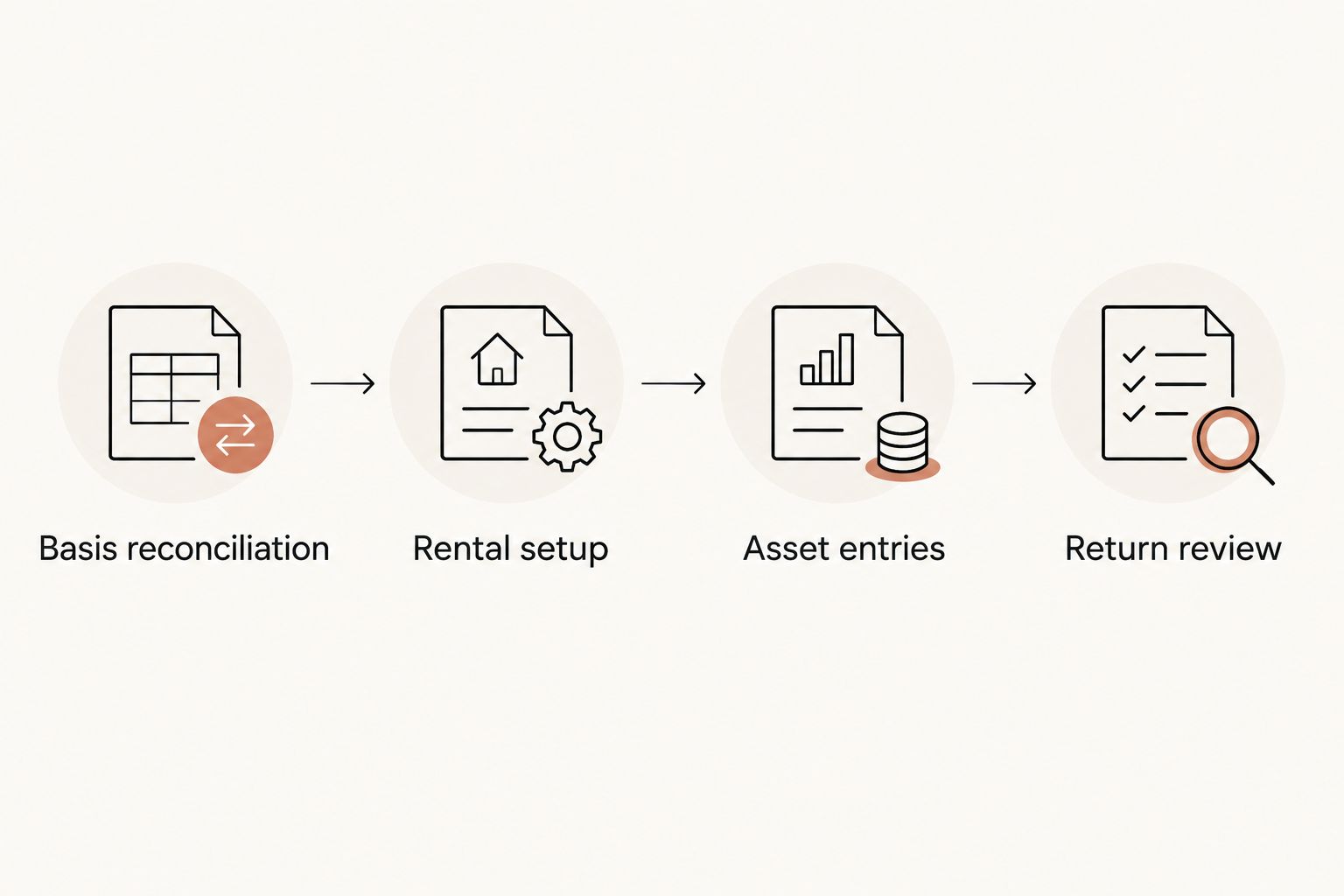
Basis reconciliation
- Identify the taxpayer’s depreciable basis from the closing records and CPA-approved adjustments. The mortgage balance is not the depreciation basis. Separate land because land is not depreciable.
- Match the study’s allocations to the basis being reported. Keep the remaining building basis separate from shorter-life components and land improvements.
- Compare the study with assets already entered in TurboTax. Furniture, appliances, and improvements recorded separately must not also remain inside another asset’s basis.
- Create an entry worksheet with columns for asset description, allocated basis, acquisition date, placed-in-service date, business-use percentage, recovery period, method, convention, and bonus treatment.
- Add the worksheet’s component amounts and remaining building amount. Reconcile that total to the approved depreciable basis before opening the asset interview.
Expected result: You have a complete, nonduplicated asset schedule whose total agrees with your CPA-approved basis. Every amount has a source, and land remains outside the depreciable total.
Do not apply an estimated reclassification percentage as though it were the study’s result. Virtual Cost Segregation savings estimates provide typical figures; the final classifications and tax outcomes depend on the property and taxpayer’s facts.
Rental setup
- Open the income section and locate Rental Properties and Royalties (Sch E). Use Start or Update, as displayed, to open the rental interview. Screen wording and placement differ across TurboTax products and tax-year releases.
- Select the correct property and review its ownership, rental use, personal use, and rental days. Keep the study tied to that property rather than creating a second rental merely to hold the reclassified assets.
- Confirm the reporting schedule with your CPA. A short-term stay does not, by itself, decide Schedule E versus Schedule C; services provided to guests and other facts matter.
- Open Assets/Depreciation for the property. Compare the existing asset list with your reconciled worksheet before adding or editing anything.
- For first-year entries, replace an unreconciled whole-building allocation with the approved remaining-building allocation and separate components. For a previously depreciated property, leave historical entries untouched until the accounting-method plan is approved.
Expected result: The correct rental contains the correct asset-entry workspace, and its use information agrees with your records. You have not duplicated the property or silently changed its filing treatment.
The software path is not a substitute for classification review. For a 2026 return, verify the completed forms rather than relying only on the interview’s summary screen.
Asset entries
- Add each asset or CPA-approved grouping from the study’s schedule. Use descriptions that allow a reviewer to trace the entry back to the report. Do not combine assets with different recovery periods or placed-in-service dates merely to shorten data entry.
- Enter allocated cost and applicable business use. Check whether the interview requests total cost or the business portion before entering a reduced amount; reducing both cost and business use can understate basis.
- Enter the actual acquisition and placed-in-service information. The study completion date is not the asset’s placed-in-service date. A rental is placed in service when it is ready and available for rental use.
- Select the asset category that produces the approved recovery period, method, and convention. Review the resulting schedule. If the interview cannot express the approved treatment, stop and have your CPA resolve the entry rather than choosing the closest-looking category.
- Review bonus depreciation separately from regular depreciation. Do not accept a default simply because TurboTax presents it.
Expected result: Each entered asset matches the approved worksheet, including its basis, recovery period, dates, method, and convention. The remaining structure stays separate from bonus-eligible components.
Recovery periods and bonus eligibility
The building of a long-term residential rental generally uses a 27.5-year recovery period. Under the short-term-rental treatment addressed here, average stays under 30 days, including the 7-days-or-less STR strategy, require review of 39-year building treatment. Have your CPA confirm the applicable classification rather than accepting a residential-building default.
The building structure does not qualify for bonus depreciation. Cost segregation identifies components with shorter recovery periods, including 5-year, 7-year, and 15-year property, where supported by the assets’ functions and documentation. An amenity’s name alone does not establish its treatment.
For eligible property acquired and placed in service after January 19, 2025, the restored bonus depreciation rate is 100% under the One Big Beautiful Bill Act, signed July 4, 2025. Both dates matter, along with the other eligibility requirements and elections. Apply this rule asset by asset, not to the entire house.
A home purchased before January 20, 2025 and later converted to rental use does not acquire a new purchase date through conversion. It does not receive the restored rate on that basis; have your CPA confirm the applicable treatment. A study ordered in 2026 does not reset either date.
Return review
- Review the generated depreciation detail and Form 4562. Compare each asset’s basis, recovery period, convention, bonus deduction, and regular depreciation with the approved implementation schedule.
- Reconcile the remaining building and component basis again. Investigate differences before filing, especially when TurboTax carries forward a building asset from an earlier return.
- Check the rental’s resulting income or loss and applicable limitation forms. Depreciation calculated on the schedule is not necessarily a deduction usable against wages on the current return.
- Review the state return separately. State depreciation treatment does not always follow federal treatment, so preserve any required state adjustment schedule.
- Save the filed return, asset detail, study, supporting records, and reconciliation worksheet together. Retain the asset information for future depreciation, dispositions, and recapture calculations.
Expected result: The return’s depreciation agrees with the approved schedule, the basis is not duplicated, and any deduction limitations are reflected in the return.
A larger loss is not proof that the entries are correct. For 2026 filing review, prioritize traceable inputs and form reconciliation over the size of the displayed deduction.
Look-back studies for an existing rental
Do not enter missed prior-year depreciation as a new asset’s current-year cost. A look-back study changes how qualifying existing costs are depreciated; it does not create another purchase.
For the look-back accounting-method workflow, missed depreciation is claimed on the current return through Form 3115 and the Section 481(a) adjustment. Prior returns are not amended as part of that workflow. Your CPA determines eligibility, calculates the adjustment, and handles the filing requirements.
Provide the original depreciation schedule, all subsequent asset changes, the completed study, and prior depreciation claimed. Your CPA must reconcile depreciation already taken with the treatment that should have applied and establish the corrected continuing schedule.
Do not assume the rental asset interview completes Form 3115. Confirm support for the required filing package in your software and use a CPA-led process if it cannot handle the approved implementation.
Virtual Cost Segregation provides Form 3115 on request; your CPA files it. The study remains a supplementary report supporting the tax treatment, not a replacement for the return or accounting-method filing.
Troubleshooting
The full building still depreciates alongside the components
Fix: Reconcile the remaining building basis against the study. In a first-year entry, remove duplicated allocations before filing. For an existing depreciation history, have your CPA coordinate the corrected schedule with the accounting-method treatment.
The software produces the wrong recovery period
Fix: Compare the selected asset category with the approved schedule. Check method and convention too. Do not change an asset’s description to force a desired deduction; resolve the category or use a filing process that supports the correct treatment.
Bonus depreciation does not match the approved calculation
Fix: Recheck acquisition date, placed-in-service date, business use, eligibility, and elections. Keep separately purchased improvements distinct where their dates differ. Never substitute the study date for a tax-relevant date.
The rental loss does not reduce W-2 income
Fix: Review passive-activity, at-risk, and other applicable loss limitations with your CPA. The STR strategy requires an average guest stay of 7 days or less and material participation. A commonly used test requires more than 100 hours and more participation than any other individual, including a property manager; 100 hours alone is insufficient. Real estate professional status is not required for that particular strategy.
Prior-year depreciation appears to have disappeared
Fix: Restore the saved schedule and stop editing historical assets. A look-back implementation must preserve and reconcile prior depreciation, including information needed for adjusted basis and a later sale.
Customize your workflow
Build a repeatable annual handoff rather than treating each return as an isolated entry exercise. Keep a property-level asset register and record additions, replacements, disposals, changes in use, and supporting invoices as they occur.
For a 2026 improvement, distinguish a repair expense from a capital asset before opening TurboTax. A replacement also requires review of the old component’s treatment; adding the new cost does not resolve the old asset automatically.
Keep tax decisions outside the data-entry session. Have your CPA approve classification and elections first, then use the software to implement and verify them. That division keeps an interview prompt from becoming an unsupported tax decision.
FAQ
Can I enter a cost segregation study in TurboTax?
You can enter an approved asset schedule in TurboTax when your edition supports the required depreciation treatment. The software calculates from your inputs; it does not establish the study’s classifications or complete every accounting-method requirement.
Where do I enter cost segregation depreciation in TurboTax?
For a rental properly reported on Schedule E, use the property’s Assets/Depreciation interview within Rental Properties and Royalties (Sch E). Screen wording varies by product and tax year, so verify the generated depreciation schedule before filing.
Should I enter the study’s total deduction as an expense?
No. Enter the approved depreciable assets and their tax attributes rather than adding the study’s calculated depreciation as another rental expense. A duplicate expense entry can overstate the deduction.
Can I delete the old building asset after a look-back study?
Do not delete an established building asset without your CPA’s implementation instructions. A look-back accounting-method workflow claims missed depreciation on the current return through Form 3115 and Section 481(a); prior returns are not amended as part of that workflow.
Does cost segregation automatically let me offset W-2 income?
No. Deduction use depends on the taxpayer’s facts and applicable loss limitations. The STR strategy requires average guest stays of 7 days or less and material participation; more than 100 hours alone does not satisfy the commonly used comparative participation test.
What bonus depreciation rule should I check for a 2026 return?
Eligible property acquired and placed in service after January 19, 2025 qualifies for the restored 100% bonus depreciation rate, subject to other requirements and elections. The building structure does not qualify, and the study date does not establish eligibility.
Does Virtual Cost Segregation file my return or Form 3115?
Virtual Cost Segregation supplies a supplementary residential cost segregation report, not a CPA filing service. Form 3115 is provided on request, and your CPA applies the study and files the required tax documents.
One last thing
Keep acquisition-date evidence even when TurboTax’s depreciation interview emphasizes the placed-in-service date. Those dates answer different questions, and a converted home’s rental start does not reset its purchase history. Store the contract and closing records beside the study so your CPA can verify both without reconstructing the transaction.