
By Virtual Cost Segregation
The best cost segregation study provider for rental property investors
 Built to IRS standards
 Audit support includedFlat price for every study3 to 5 business days
Instead of manually copying cost segregation deductions into Stessa as expenses, reconcile your Stessa operating records to a separate, CPA-approved depreciation schedule so noncash deductions do not distort cash flow. This cost segregation Stessa workflow explains how to organize the study, reconcile property costs, and hand your CPA a consistent 2026 tax package.
- For cost segregation Stessa workflows, reconcile operating records to a CPA-approved depreciation schedule rather than creating cash expenses.
- Virtual Cost Segregation supplies engineering-based residential studies; your CPA applies the report when filing.
- Separate asset basis, annual depreciation, and any Section 481(a) adjustment before completing your tax package.
- Match each property and tax year across Stessa records, the study, and your CPA’s depreciation schedule.
Why this matters
Depreciation reduces tax income without creating a new cash payment. Recording the deduction as though you paid another bill mixes tax accounting with operating performance. Your bank reconciliation can be correct while your tax handoff still double-counts an asset.
A study reallocates eligible property costs among depreciation classes. It does not create additional acquisition cost, and it does not replace the records showing what you bought and when you began renting it.
Virtual Cost Segregation is best for residential rental owners who need an engineering-based cost segregation study for their CPA to implement. Start with the client-to-CPA handoff checklist to organize the supporting records before changing your bookkeeping.
Before you start
- Access: Have access to the correct property’s Stessa records and the income, expense, and capital-purchase records for the tax year. Confirm the ownership entity and property address.
- Materials: Gather the final study, closing statement, land allocation, improvement invoices, acquisition date, placed-in-service date, and existing depreciation schedule. Have your CPA review the tax treatment.
- The gotcha: An appliance or improvement already tracked separately can also appear in the study’s allocation. Resolve overlapping basis before adding assets to the tax schedule; importing both amounts can duplicate deductions.
This guide uses a document-and-reconciliation workflow rather than assuming a direct study import or a particular depreciation-entry screen. Your CPA’s tax schedule controls the depreciation calculation; the steps below organize the records supporting it.
Property records
Match the property and tax year
- Identify the property in Stessa whose records you are reconciling. Match its address and legal owner to the study and your CPA’s records.
- Obtain the property’s income and expense records for the relevant tax year. Keep the underlying transaction detail with your reconciliation workpaper.
- Create a separate workpaper titled with the property address and tax year. Use headings such as Operating records, Capital costs, Depreciation schedule, and Reconciliation. These are workpaper headings, not Stessa interface labels.
- Record the acquisition and placed-in-service dates separately. A closing date is not automatically the date the rental became ready and available for rent.
Expected result: Your Stessa records, study, and tax workpaper identify the same property, owner, and reporting period.
For a rental first placed in service in 2026, retain evidence of when it became ready and available for rental use. For a property already rented in an earlier period, preserve its original service date rather than substituting the study completion date.
Separate operating expenses from asset costs
- Review purchase-related and renovation transactions in your property records. Identify amounts that your CPA has classified as capital costs rather than current operating expenses.
- Match those costs to closing documents and invoices. Separate land from depreciable property using the allocation approved by your CPA.
- Flag furnishings, appliances, and improvements already listed individually on the existing depreciation schedule.
- Give the flagged list to your CPA and study provider before finalizing the revised asset schedule. Ask them to resolve any overlap between separately tracked assets and study allocations.
Expected result: Each capital cost has a documented source and is included in depreciable basis only once.
Do not delete the payment record merely because an asset belongs on a depreciation schedule. The payment documents cash movement; the depreciation schedule documents tax cost recovery. Those records serve different purposes.
Depreciation workpaper
Map the study to tax assets
- Start with the final engineering-based report, not a preliminary savings estimate.
- List the study’s asset descriptions, allocated basis, recovery periods, and supporting cost sources in your workpaper.
- Have your CPA review the classifications, depreciation methods, conventions, and applicable elections before calculating deductions.
- Reconcile the total allocated basis to the approved depreciable basis. Explain differences rather than forcing the totals to match with an unsupported adjustment.
Expected result: Your CPA can trace each tax asset from the study to the depreciation schedule without adding new property cost.
Cost segregation can identify eligible components with 5-year, 7-year, and 15-year recovery periods. Treatment depends on the component’s function, documentation, service date, and taxpayer facts. Do not assign an entire renovation to a shorter life because one component qualifies.
The building of a long-term residential rental generally uses a 27.5-year recovery period. For a short-term rental with average stays under 30 days, including the 7-day-average STR strategy, the building uses a 39-year recovery period. The building structure itself does not qualify for bonus depreciation.
Confirm bonus eligibility separately
- Give your CPA the acquisition documents, including relevant contract dates, and placed-in-service evidence.
- Ask your CPA to determine bonus eligibility for each qualifying asset under current law.
- Keep the bonus calculation separate from the study’s allocation of asset basis.
- Record the approved annual deduction in the tax workpaper, together with the schedule version and approval date.
Expected result: The depreciation deduction reflects eligible assets and applicable timing rules, not just the year you ordered the study.
For qualifying property acquired and placed in service after January 19, 2025, the restored bonus depreciation rate is 100%. Both timing conditions matter. A study completed in 2026 does not change when the property was acquired or placed in service.
Converting a home to rental use does not reset its acquisition date. A home bought before January 20, 2025 and converted later does not receive that restored rate merely because of the conversion; have your CPA confirm the treatment based on the purchase date and applicable rules.
Stessa-to-tax reconciliation
Choose the record that controls each amount
Use the following division of responsibility when deciding where a number belongs. These are complementary records, not competing ways to calculate the same deduction.
| Record | Best for | Strength | Limitation |
|---|---|---|---|
| Stessa operating records | Tracking rental income and payments | Documents property-level operating activity | Cash activity alone does not establish tax depreciation |
| Engineering-based study | Supporting component allocations | Connects classified assets to allocated costs | Does not determine whether you can currently use every deduction |
| CPA depreciation schedule | Calculating annual tax depreciation | Applies methods, conventions, elections, and prior depreciation | Depends on accurate basis and source documents |
| Reconciliation workpaper | Connecting bookkeeping to the return | Explains noncash deductions and classification differences | Requires updates when the underlying records change |
Keep one approved tax schedule, not competing depreciation totals. A study estimate, bookkeeping summary, and tax return can show different figures because they measure different things. Label each figure by purpose.
Complete the annual reconciliation
- Start with the rental income and expense totals supported by your Stessa records.
- Identify capital purchases that should not remain deducted as ordinary operating expenses. Have your CPA approve any reclassification.
- Add the CPA-approved depreciation deduction to the tax reconciliation, not as a second payment from your bank account.
- List any other book-to-tax differences separately. Do not bury personal-use allocations or other tax adjustments inside a depreciation total.
- Compare the reconciliation with the return your CPA prepares. Resolve differences before treating the tax package as final.
Expected result: Your operating records still explain cash activity, while the tax reconciliation separately explains depreciation and other tax adjustments.
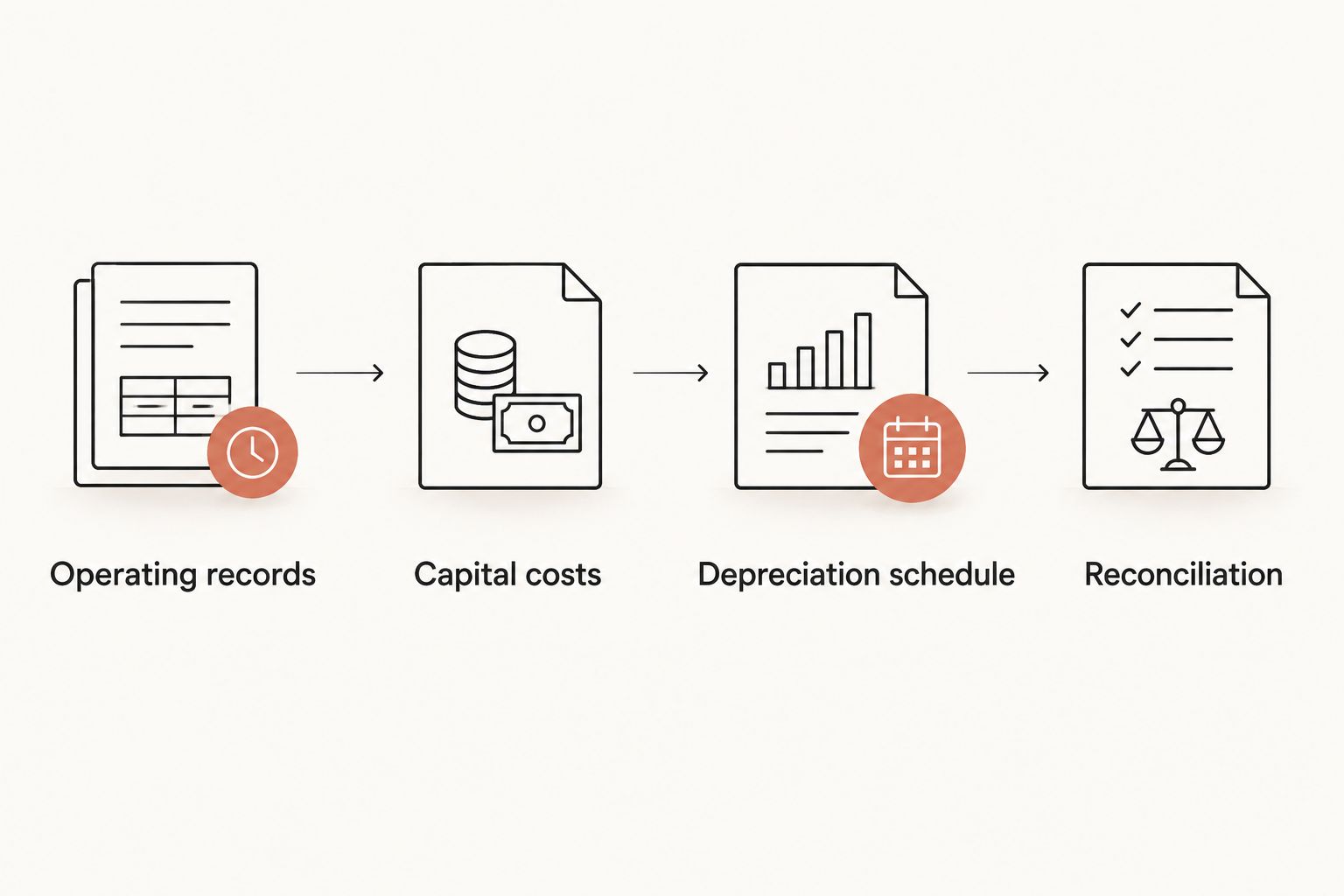
For the 2026 package, retain the study version, approved depreciation schedule, reconciliation, and supporting invoices together. If your CPA later changes a classification, update the workpaper and preserve the explanation rather than silently replacing the original number.
Virtual Cost Segregation provides engineering-based studies for residential rentals of 1 to 4 units, with no site visit required. The study supports your CPA’s implementation; the service does not replace tax preparation or the CPA’s review of deduction limits.
Updated-study and look-back workflow
An updated report and a look-back study require different checks. Use this variant whenever a final study changes or you receive a study for property already depreciated on filed returns.
- Identify the change. Separate corrected source information, newly added improvements, and reclassification of existing property. A new improvement needs its own cost and service-date support.
- Compare schedules. Give your CPA the existing depreciation schedule and revised study. Identify the affected assets and prior depreciation before calculating any adjustment.
- Confirm the filing treatment. For a look-back accounting-method change, missed depreciation is claimed on the current return through Form 3115 and a Section 481(a) adjustment; prior returns are not amended for that change. Your CPA determines the applicable procedure and files the form.
- Separate the amounts. Keep current-year depreciation and the Section 481(a) adjustment on distinct lines in the reconciliation. Neither is a new cash payment in Stessa.
- Preserve the explanation. Retain the prior schedule, revised schedule, study, and CPA’s reconciliation of the change.
Expected result: The updated tax package explains both ongoing depreciation and any catch-up adjustment without duplicating deductions already claimed.
For a 2026 look-back implementation, do not apply current acquisition rules automatically to an older purchase. Original acquisition facts and applicable historical rules remain relevant even though the adjustment appears on the current return.
Troubleshooting
Cash flow falls after entering depreciation
Check whether the noncash deduction was recorded as an ordinary cash expense. Have your CPA review the entry and separate tax depreciation from operating payments while preserving genuine bank transactions.
The study basis exceeds your tax basis
Compare land, closing-cost treatment, ownership share, and separately scheduled assets. Resolve the discrepancy against source documents; do not increase basis merely to match a report total.
Furniture appears twice
Match the original furniture invoices and existing asset schedule to the study’s scope. Ask your CPA and study provider to identify which allocation already includes the cost before removing or retaining either amount.
The deduction differs from the estimate
Compare bonus eligibility, service dates, conventions, elections, and prior depreciation. Also separate the calculated deduction from the amount currently usable after tax limitations; an estimate is not the final return calculation.
The report changed after the handoff
Stop using the superseded allocation for tax implementation. Send the revised report to your CPA, identify the changes, and update the reconciliation so everyone works from the same approved schedule.
Customize your workflow
Expand the reconciliation by property rather than combining your portfolio into one depreciation line. Keep acquisition costs, later improvements, and dispositions identifiable so your CPA can follow each asset’s history.
For short-term rentals, maintain participation records separately from financial records. A deduction does not become usable against W-2 income simply because it appears in a study or bookkeeping report. The STR strategy requires an average guest stay of 7 days or less and material participation; the commonly used test requires more than 100 hours and more participation than any other individual, including a property manager.
Give your CPA the participation records alongside the depreciation package. Let the CPA apply current law to your facts rather than treating the bookkeeping entry as proof of eligibility.
FAQ
How do I add cost segregation depreciation to Stessa?
Reconcile your Stessa operating records to a separate, CPA-approved depreciation schedule. Keep the noncash tax deduction separate from actual property payments, and retain the study with the supporting tax workpaper.
Should I enter bonus depreciation as a rental expense payment?
No. Bonus depreciation is a noncash tax deduction, not a new payment. Your CPA should calculate it on the tax depreciation schedule and reconcile it to your operating records.
Does a cost segregation study replace my CPA’s depreciation schedule?
No. The study supports asset classifications and allocated costs; your CPA applies depreciation methods, conventions, elections, and applicable limitations when preparing the return.
Can I use my savings estimate instead of the final study?
Use the final study and your CPA’s approved calculations for tax implementation. Estimates describe potential outcomes and are not the final deduction or a determination of what you can currently deduct.
What happens if I already claimed depreciation on the rental?
Your CPA reconciles prior depreciation before implementing the study. For a look-back accounting-method change, missed depreciation is claimed on the current return through Form 3115 and a Section 481(a) adjustment; prior returns are not amended for that change.
Does Virtual Cost Segregation file my tax return?
No. Virtual Cost Segregation provides the engineering-based study, and your own CPA applies it when filing. The study is a supplementary report, not a tax return filed with the IRS.
Will adding depreciation to my records let me offset W-2 income?
A bookkeeping entry does not establish eligibility to offset W-2 income. Your CPA must evaluate the rental activity, material participation, and applicable loss limitations before determining how the deduction affects your return.
One last thing
Reclassifying basis and deducting depreciation are different events. The study changes how eligible costs are grouped for tax recovery; it does not mean the reclassified basis equals your current deduction. Keep both figures visible in your workpaper so a large allocation never becomes an unsupported expense entry.
This workflow is general educational guidance, not individualized tax advice. Have your CPA apply current law to your property and filing circumstances.