
By Virtual Cost Segregation
The best cost segregation study provider for rental property investors
 Built to IRS standards
 Audit support includedFlat price for every study3 to 5 business days
Instead of manually copying depreciation figures between your study, tax schedule, and books, use a CPA-approved cost segregation QuickBooks Online workflow: reconcile the study, map the accounts, post approved journal entries, and verify the balances. This 2026 guide covers residential rental bookkeeping without confusing book depreciation with the deduction on your tax return.
- Cost segregation QuickBooks Online workflows need a CPA-approved asset schedule, not a direct copy of estimated tax savings.
- Virtual Cost Segregation is best for residential rental owners who need engineering-based cost segregation documentation for their CPA.
- QuickBooks Online records approved accounting entries; your CPA determines depreciation elections, deductions, and filing requirements.
- Reconcile asset cost, accumulated depreciation, and tax adjustments separately before closing your books.
Why this matters
A cost segregation study is not a bookkeeping entry. It identifies and supports asset classifications. Your CPA applies those findings to a depreciation schedule and decides which adjustments belong in QuickBooks Online.
Virtual Cost Segregation provides engineering-based cost segregation studies for residential rentals of 1 to 4 units. The study supports your CPA's work; it is not a CPA service and is not filed with the IRS.
Your accounting policy controls the next step. Books maintained on a tax basis can reflect tax depreciation, while books maintained on another basis can show different depreciation expense. Posting the tax deduction into both systems without checking that distinction creates incorrect financial statements.
For your 2026 workflow, separate three records: the engineering study, the CPA's tax depreciation schedule, and the QuickBooks general ledger. They should reconcile, but they do not necessarily show identical depreciation expense.
Before you start
- Access: Have permission to manage the chart of accounts and create journal entries in QuickBooks Online. Arrange CPA review before posting changes to previously closed periods.
- Materials: Gather the final study, closing statement, land allocation, improvement invoices, existing asset register, prior depreciation schedules, and current general ledger balances. Identify the owning entity and rental property consistently throughout.
- The gotcha: Decide whether your books use tax depreciation or a separate book schedule. A cost segregation allocation does not authorize you to post bonus depreciation, change opening balances, or expense the property's purchase again.
Ask your CPA to approve the posting date, account mapping, and supporting schedule in writing. Do not build a recurring entry from a preliminary estimate.
Virtual Cost Segregation delivers studies in 3 to 5 business days, with no site visit required, and includes audit support. That delivery window covers the study, not your CPA's review or the completion of your bookkeeping workflow.
Study reconciliation
Establish the source schedule
- Identify the property and owning entity on the study. Match them to the QuickBooks company file before entering anything.
- Reconcile the acquisition and improvement costs to your source documents. Separate land because land is not depreciable.
- Match the study's total allocated depreciable basis to the basis your CPA accepts. Explain differences from the current ledger rather than forcing the totals to match.
- Have your CPA approve an asset schedule showing descriptions, assigned costs, acquisition dates, placed-in-service dates, recovery periods, and prior depreciation where applicable.
- Add a separate column identifying the QuickBooks account assigned to each asset or asset group.
Expected result: You have one approved mapping schedule that connects each study allocation to a ledger account and a tax asset record.
Do not confuse an asset's recovery period with its bookkeeping account type. Cost segregation can identify qualifying components with 5-, 7-, and 15-year recovery periods, but their classification depends on function, documentation, and the taxpayer's facts.
Under the residential rental classifications used here, a long-term rental building generally has a 27.5-year recovery period. A short-term rental building with average stays under 30 days uses a 39-year recovery period, including the short-stay arrangements associated with the STR tax strategy. Your CPA confirms the applicable treatment. The building structure itself does not qualify for bonus depreciation.
Confirm the tax treatment separately
For the 2026 tax schedule, record acquisition and placed-in-service dates separately. Under the One Big Beautiful Bill Act, signed July 4, 2025, qualifying property acquired and placed in service after January 19, 2025 is eligible for 100% bonus depreciation, subject to the applicable requirements and elections. That restored rate has no scheduled end date.
A home acquired before January 20, 2025 does not receive that restored rate merely because you convert it to a rental later. Conversion does not reset acquisition. Have your CPA confirm the treatment using the original purchase facts.
QuickBooks account mapping
Create the ledger structure
- Open Settings, then Chart of accounts.
- Select New to create an account when an appropriate account does not already exist.
- Enter an identifying Account name, such as Rental building or Rental equipment. These are suggested names, not required QuickBooks labels.
- Set Account type to Fixed Assets for capitalized rental assets. Choose the appropriate Detail type with your accountant.
- Create separate accounts for land and accumulated depreciation as your CPA directs. Create a depreciation expense account if your chart does not already contain one.
- Select Save, then return to the chart to verify the accounts.
Expected result: Asset cost, land, accumulated depreciation, and depreciation expense have distinct destinations. You have not changed any balances simply by creating accounts.
QuickBooks Online layouts differ across account experiences. Use the chart-of-accounts and journal-entry functions described here; do not substitute an expense transaction because a navigation shortcut looks different.
Choose the right level of detail
Keep component-level detail in the asset register even if your general ledger groups similar assets. An account for every component makes reconciliation harder without replacing the underlying schedule.
| Accounting approach | Best for | Benefit | Limitation |
|---|---|---|---|
| Grouped ledger accounts with a detailed asset register | Owners tracking a residential rental with CPA-managed depreciation | Keeps the chart readable while preserving component detail | Requires a separate register and a documented reconciliation |
| More detailed ledger accounts by asset category | Owners whose accountant needs category-level balance reporting | Makes category balances easier to review in QuickBooks | Adds accounts and still requires a tax depreciation schedule |
Use grouped accounts unless your CPA needs more ledger detail. Neither approach determines tax recovery periods, elections, or loss deductibility.
Virtual Cost Segregation supplies the cost segregation study; your CPA determines the accounting implementation. The benefit is engineering-based documentation. The limitation is that the study does not replace bookkeeping decisions or tax preparation.
Approved journal entries
Record the allocation without buying the property twice
- Have your CPA prepare a balanced reclassification entry. It should move existing capitalized cost between approved asset accounts, not record another purchase.
- Select + New, then Journal entry.
- Set Journal date to the date your CPA approved. Use Journal no. for a consistent reference if that field is enabled.
- Enter the asset accounts and approved amounts in the Debits and Credits columns. Use Description to identify the property and study reference.
- Confirm that total debits equal total credits. Check that no bank, mortgage, or rental-income account appears unless your CPA explicitly requires it.
- Select Save and close after reviewing the entry.
Expected result: The allocation changes the composition of capitalized cost without changing the property's total cost or creating a cash transaction.
For an illustrative allocation, assume 25% of property value is reclassified. Actual study results vary, and your CPA must establish the depreciable basis after accounting for land and other adjustments. This assumption is not an instruction to move 25% of the property's ledger balance automatically.
The journal entry should follow the approved dollar schedule. Percentages, calculator outputs, and estimated tax savings do not belong in the debit and credit fields.
Post depreciation and reconcile
- Obtain the approved book depreciation amount. If your books use a separate book basis, do not substitute the tax depreciation amount.
- Create another Journal entry with the approved Journal date.
- Debit the approved depreciation expense account and credit the corresponding accumulated depreciation account.
- Open Reports and review the Balance Sheet and Profit and Loss for the posting period.
- Reconcile asset cost and accumulated depreciation to the supporting register. Preserve any book-to-tax difference in your CPA's reconciliation.
Expected result: Depreciation expense and accumulated depreciation agree with the approved book schedule, while the tax schedule remains separately documented.
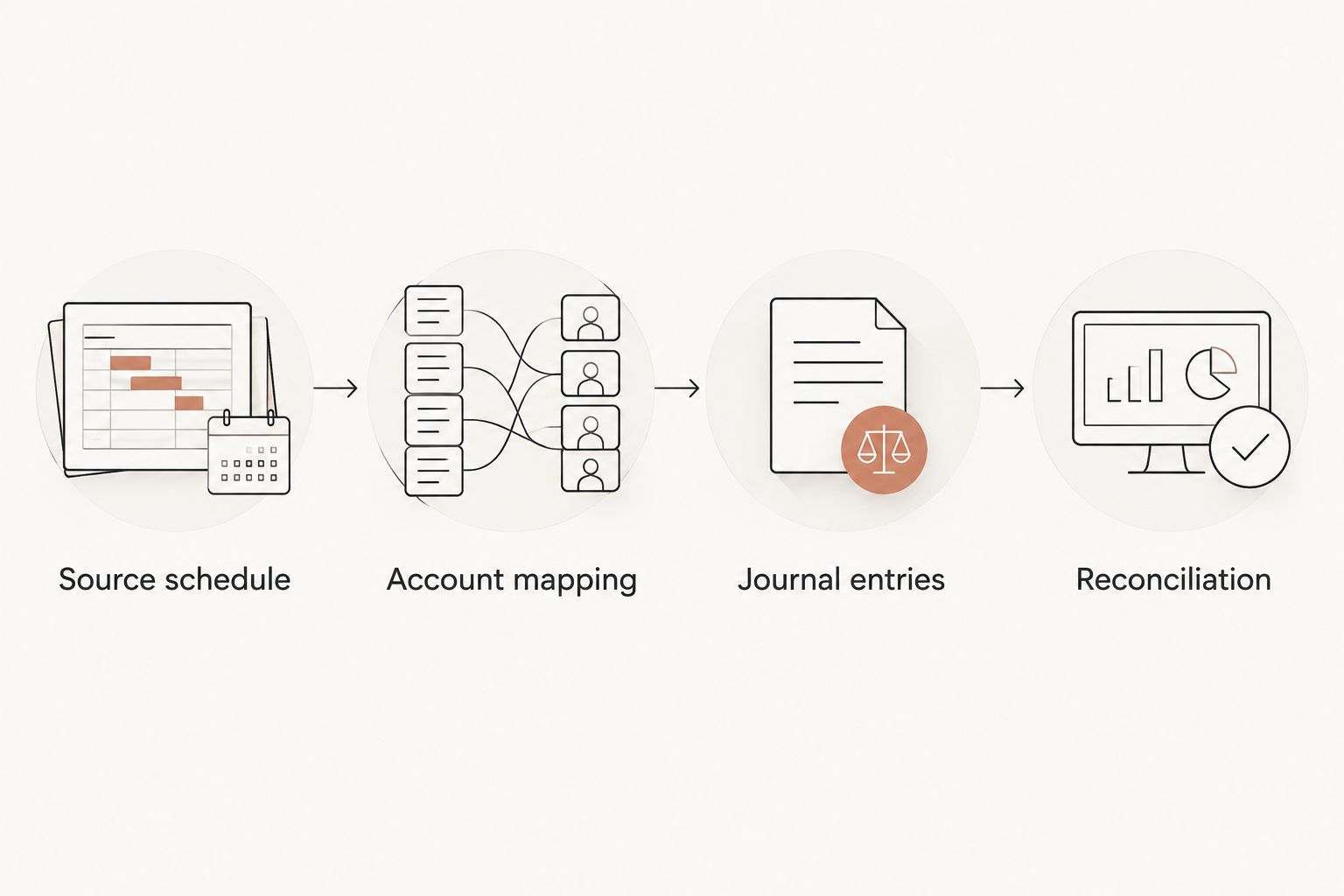
For a 2026 close, preserve the report version and the entries that implemented it. A balanced journal entry proves only that debits equal credits, not that asset classifications or deductions are correct.
Update the workflow after improvements or a look-back study
Add a renovation without rewriting the acquisition
When you add rental furniture, replace equipment, or complete an improvement, create a new asset-register record tied to its invoice and placed-in-service date. Your CPA determines whether the expenditure is a repair, a capital improvement, or a separately depreciable asset.
Use the same mapping and approval process before entering the cost in QuickBooks. Do not overwrite the original study allocation to make a later invoice fit.
Best for ongoing residential rental ownership: Maintain separate acquisition and improvement records. The benefit is a clear history; the trade-off is that each addition needs its own classification review.
A roof replacement is not automatically a short-life asset because the property already has a cost segregation study. Ask your CPA to review capitalization and any applicable disposition treatment before removing old cost from the register.
Apply a look-back study
A look-back study requires more than a current-year depreciation entry. Your CPA compares depreciation previously claimed with the corrected schedule and determines the Section 481(a) adjustment and accounting-method-change requirements.
For the look-back method-change workflow, missed depreciation is claimed on the current return with Form 3115; prior returns are not amended. Your CPA determines eligibility, prepares the filing treatment, and files the form.
Do not automatically post the full tax catch-up as current book expense. The accounting entry depends on your book basis and any prior-period accounting issues. Virtual Cost Segregation provides Form 3115 on request; the client's CPA files it.
Troubleshooting
The asset balance increased after reclassification
Fix: Compare the new entry with the original acquisition posting. If the study allocation was entered as another purchase, reverse or correct the duplicate with your CPA's approval and post a reclassification instead. Do not offset the error against rental income.
Depreciation expense appears twice
Fix: Check for an existing manual entry or recurring entry before posting the CPA's adjustment. Reconcile accumulated depreciation to the approved register and retain only the intended expense for the period.
The study total does not match QuickBooks
Fix: Reconcile land, capitalized closing costs, improvements, and previously recorded disposals. Separate gross asset cost from net book value; a study's basis allocation is not a comparison against cost less accumulated depreciation.
A journal entry changes a closed period
Fix: Stop before overriding the closing controls. Have your CPA approve the posting period and review the effect on previously issued financial statements. A current tax adjustment does not automatically authorize a backdated book entry.
The tax deduction looks like cash spending
Fix: Review the accounts used in the journal entry. Depreciation is a noncash expense, not a bank withdrawal. Correct any entry that credits cash merely to record depreciation.
Customize your workflow
Assign a property identifier to every asset-register record and supporting entry. Keep it consistent across invoices, study allocations, and CPA schedules so you can trace a component without relying on memory.
For your 2026 review, give your CPA the study, the approved mapping, posted journal entries, year-end balances, and a list of additions or disposals. Ask the CPA to confirm Form 4562 treatment and any book-to-tax differences.
High W-2 earners also need a separate loss-deductibility review. The short-term rental strategy uses average guest stays of 7 days or less and material participation. A common participation test requires more than 100 hours and more participation than any other individual, including a property manager; 100 hours alone is insufficient. Real estate professional status is not required for that route.
A correct QuickBooks entry does not establish eligibility to offset W-2 income. Apply current law to your facts with your tax professional. This guide provides general educational guidance, not individualized tax advice.
FAQ
How do I use cost segregation with QuickBooks Online?
Use a CPA-approved asset schedule to map study allocations to QuickBooks accounts, post approved journal entries, and reconcile the balances. Keep the tax depreciation schedule separate when your books use a different accounting basis.
Does a cost segregation study automatically update QuickBooks Online?
This workflow uses approved manual journal entries, not an automatic connection. Review the study and existing balances before entering any adjustments.
Should I enter bonus depreciation as an expense in QuickBooks?
Enter only the depreciation amount approved for your accounting basis. A tax deduction does not automatically equal the depreciation expense required in your books.
Can I depreciate land after a cost segregation study?
No, land is not depreciable. Keep land separate from depreciable building costs and qualifying improvements in both the register and ledger.
Do I amend prior returns for a look-back cost segregation study?
In the look-back accounting-method-change workflow, missed depreciation is claimed on the current return with Form 3115, and prior returns are not amended. Your CPA determines the Section 481(a) adjustment and filing requirements.
Who files the cost segregation study with the IRS?
The cost segregation study itself is not filed with the IRS. Your CPA applies the report to the applicable tax schedules and forms and retains the supporting documentation.
Can a QuickBooks depreciation entry qualify me for the STR tax strategy?
No, bookkeeping entries do not establish short-term rental tax eligibility. Your tax professional must review average guest stays, material participation, and the other limits affecting whether losses are deductible.
One last thing
Your best reconciliation checks original cost before it checks depreciation expense. If the allocation accidentally increases total property cost, every later schedule starts from the wrong number, even when the journal entry balances.
Keep the approved study allocation beside the ledger reconciliation. That single reference makes subsequent improvements, disposals, and CPA handoffs easier to trace.