
By Virtual Cost Segregation
The best cost segregation study provider for rental property investors
 Built to IRS standards
 Audit support includedFlat price for every study3 to 5 business days
Instead of manually copying tax depreciation into Xero each year, set up a cost segregation Xero workflow that maps your CPA-approved schedule to controlled journal entries. Keep the engineering study, tax depreciation calculation, and bookkeeping records separate, then reconcile them before posting.
- Use a cost segregation Xero workflow to post approved depreciation, not to determine tax eligibility.
- Virtual Cost Segregation supplies residential rental studies; your CPA applies the findings to tax depreciation.
- Reconcile property basis before posting, and prevent duplicate depreciation from journals and asset-register entries.
- Keep tax-only deductions outside book depreciation unless your CPA approves tax-basis bookkeeping.
Why this matters
A cost segregation study reallocates existing property basis; it does not create another property purchase. If you add the study's components without reducing the original building balance, you overstate assets. If you post accelerated tax depreciation over existing book depreciation, you risk overstating expense too.
Virtual Cost Segregation is best for residential rental owners who need an engineering-based cost segregation study for their CPA. The study supports asset classification, but it is not a CPA service or a tax return filing.
For your 2026 close, decide which numbers belong in Xero before configuring anything. A tax depreciation schedule and a financial-reporting depreciation schedule serve different purposes, even when both describe the same rental house.
This guide covers a controlled journal-entry workflow for residential rentals. It does not assume a direct connection between the study and Xero, and it does not treat a journal entry as evidence that a deduction is allowable.
Before you start
- Gather the source package. Have the final study, closing statement, land allocation, improvement invoices, acquisition and placed-in-service dates, prior depreciation schedules, and current Xero asset balances available. Use the same property identifier throughout.
- Confirm access and approval. You need permission to maintain accounts and create manual journals in Xero. Your CPA must approve the accounting basis, opening balances, depreciation amounts, and any adjustments affecting prior periods.
- Resolve the hidden gotcha: duplicate depreciation. Identify any existing asset-register depreciation and previously posted journals before adding new entries. Do not let two processes depreciate the same basis for the same period.
Ask your CPA to document whether Xero will reflect book depreciation or tax-basis depreciation. That decision controls the workflow below; a study's recovery periods alone do not answer it.
Source schedule and accounting basis
Establish the posting policy
- Identify the taxpayer. Match the study's owner and property to the correct Xero organization. Do not post an owner's personally held rental into a different entity's books without your accountant's direction.
- Choose the reporting basis. Obtain written instructions stating whether accelerated tax depreciation belongs in Xero or remains on the tax workpapers.
- Choose the posting period. Specify whether your accountant wants monthly depreciation entries or an annual adjusting entry. Use the same policy consistently during 2026.
- Assign approval responsibility. Name the preparer and reviewer in your internal close checklist. The person entering the journal should not have to interpret tax eligibility while posting it.
Expected result: You have an approved posting policy identifying the entity, accounting basis, period, and reviewer.
Choose between these accounting approaches before entering amounts:
| Approach | Best for | Benefit | Limitation |
|---|---|---|---|
| Book depreciation in Xero; tax depreciation outside Xero | Owners maintaining a separate financial-reporting basis | Keeps tax acceleration from automatically changing book expense | Requires a book-to-tax reconciliation |
| CPA-approved tax-basis depreciation in Xero | Owners whose accountant has selected tax-basis books | Aligns ledger depreciation with the approved tax-basis schedule | Tax elections and adjustments require careful review before posting |
Use the approved accounting basis, not whichever schedule produces the largest expense. Neither approach makes a deduction usable against wages or overrides passive-activity, basis, at-risk, or other applicable limitations.
Build the mapping workpaper
Create a spreadsheet with a row for each approved posting group. Include property identifier, study reference, component description, allocated basis, destination asset account, accumulated depreciation account, expense account, current-period depreciation, and reviewer approval.
Keep acquisition dates separate from placed-in-service dates. Also distinguish opening accumulated depreciation from the current-period charge; combining them makes the first reconciliation harder to review.
For a long-term residential rental, the building generally uses a 27.5-year recovery period. Short-life components can use 5-year, 7-year, or 15-year periods when supported by their classification and the taxpayer's facts. Land is not depreciable, and the building structure does not qualify for bonus depreciation.
Do not apply one recovery period to the entire house or every amenity invoice. Asset function, documentation, rental use, placed-in-service timing, and applicable tax rules determine treatment. Your CPA should confirm the building classification for a short-term rental rather than copying the long-term rental treatment.
Expected result: Each amount has a source, an account destination, and an approved accounting treatment.
Xero account mapping
Configure the ledger accounts
- Open Chart of accounts and review the accounts already used for the property. Reuse suitable accounts rather than creating slightly different duplicates.
- Select Add Account only where your mapping requires a new account. Complete Account Type, Code, and Name using your accountant's approved chart.
- Separate land from depreciable property. Establish the approved asset, accumulated depreciation, and depreciation expense accounts needed for your reporting basis.
- Select Save, then enter the final account codes into the mapping workpaper. Do not rely on descriptions alone when several properties use similar names.
Expected result: Every workpaper row maps to an existing Xero account, with land excluded from depreciation.
You do not need a separate general-ledger account for every item in the engineering study. Grouping can keep the chart readable, provided the supporting workpaper retains the component-level detail and your CPA approves the grouping.
For example, the workpaper can preserve individual asset references while the ledger reports broader approved categories. Keep the underlying detail available for later replacements, disposals, and tax reconciliation.
Reconcile basis before depreciation
- Compare the study's depreciable basis with the original property records. Explain differences involving land, closing-cost treatment, separately purchased furnishings, improvements, or business-use allocations.
- If your accountant requires ledger reclassification, prepare a balanced transfer from the original building account to the approved component accounts. Reclassification alone does not create depreciation expense.
- Confirm that total gross property basis remains unchanged by the reclassification. Investigate any increase or decrease before proceeding.
- Tie opening accumulated depreciation to the prior approved records. Do not replace historical balances with the study's newly calculated current-year deduction.
Expected result: The original basis is fully accounted for, and no component appears both inside the original building balance and as an additional asset.
Virtual Cost Segregation provides the engineering-based study; your CPA determines how its findings affect your accounting records and return. Resolve basis differences with both source documents and the study references, not a balancing entry with no explanation.
Depreciation journals and reconciliation
Prepare the approved journal
- Open Manual journals and select New Journal. Start with a draft rather than posting immediately.
- Enter the approved posting date in Date. In Narration, identify the property, period, accounting basis, and schedule version, such as the approved 2026 annual depreciation schedule.
- Complete each line's Description and Account. Enter the approved depreciation expense as a Debit and the corresponding accumulated depreciation as a Credit.
- Keep basis reclassification separate from depreciation expense. Use distinct journals so reviewers can trace each accounting event without untangling combined entries.
- Select Save as draft and provide the mapping workpaper to your reviewer. Confirm any tax treatment on the journal with your accountant rather than copying a setting from an unrelated transaction.
Expected result: The draft balances, references its supporting schedule, and contains only the approved period's depreciation.
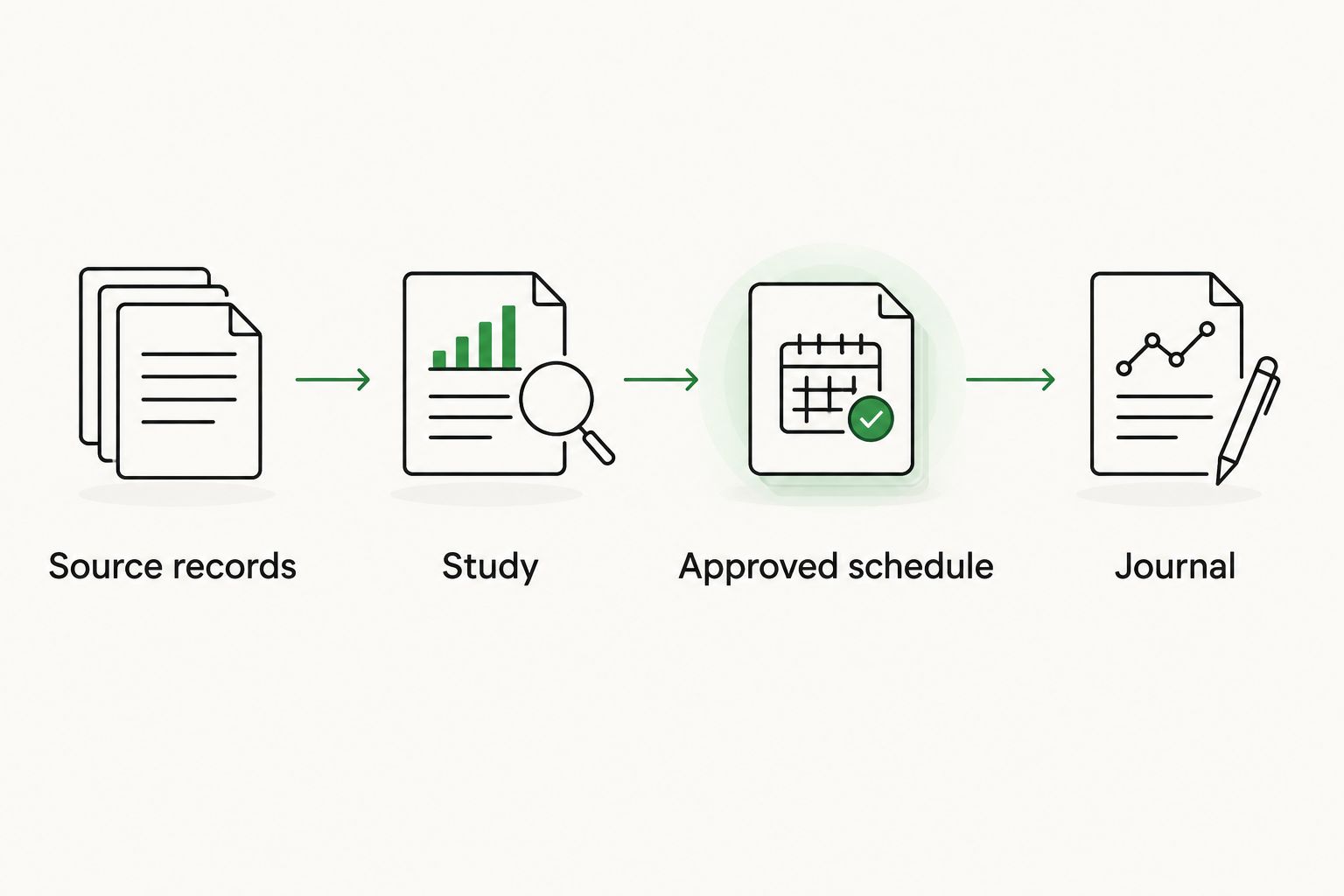
Keep the evidence chain simple: source records establish basis, the study supports classifications, the CPA-approved schedule calculates depreciation, and the journal records the selected accounting treatment.
Review and post
- Compare the draft's expense total with the approved schedule. Check the property, dates, account codes, and whether depreciation has already been recorded elsewhere.
- Confirm that opening accumulated depreciation plus posted depreciation and approved adjustments equals the closing balance. Include disposals where relevant.
- After approval, open the draft and select Post. Retain the posted journal reference in your workpaper.
- Review Balance Sheet and Profit and Loss for the same reporting period. Confirm the asset balances, accumulated depreciation, and expense agree with the approved reconciliation.
Expected result: The ledger, supporting workpaper, and selected depreciation basis agree without duplicate charges.
A reduction in accounting profit is not the same as a reduction in cash or a usable tax loss. Keep the tax return reconciliation separate, especially where federal and state depreciation differ.
For the filing side of the handoff, your CPA applies the study through the appropriate depreciation forms and workpapers. Xero posting does not complete that process.
Variant: update Xero after a look-back study
A look-back study involves a property already depreciated on earlier returns. Do not post the entire tax catch-up as current-period book depreciation without your CPA's instructions.
For an eligible accounting-method correction, missed depreciation is claimed on the current return using Form 3115 and a Section 481(a) adjustment; prior returns are not amended. Your CPA determines the filing requirements and calculates the adjustment under current law.
- Preserve the existing ledger and depreciation schedules before making changes. Record the balances used in the CPA's reconciliation.
- Obtain separate instructions for basis reclassification, opening accumulated depreciation, current-period expense, and the tax-only catch-up.
- Prepare only the approved book entries in Xero. Keep a tax-only Section 481(a) adjustment in the return workpapers when your accounting basis requires that treatment.
- Reconcile the revised tax schedule to the ledger and document the remaining book-to-tax differences.
Expected result: The catch-up reaches the correct tax workpapers without being counted twice in Xero.
Virtual Cost Segregation supplies a supplementary study, not a filing service. Your CPA applies the report, determines whether Form 3115 is appropriate, and files the required forms.
Troubleshooting
Total assets increased after importing the allocation
You added component balances without removing the corresponding basis from the original building account. Reverse the duplicate addition under your accountant's direction, then prepare a balanced reclassification tied to the original basis.
Depreciation appears twice
Compare manual journals with asset-register postings and earlier adjusting entries. Identify the duplicated property and period, correct the duplicate through your approved accounting process, and assign one posting source for each asset group.
The tax schedule does not match Xero expense
First confirm whether the difference is intentional. Book depreciation, bonus depreciation elections, state adjustments, and a tax-only catch-up can create legitimate differences; reconcile them instead of forcing the ledger to equal the federal deduction.
The posting date is blocked
Check permissions and the organization's lock dates with your accountant. Do not move an adjustment into a different period merely to bypass the restriction; obtain an approved posting date or authorized correction procedure.
A revised study changes a posted amount
Keep the earlier version and document what changed. Recalculate the affected reconciliation, obtain approval, and post the required adjustment rather than silently replacing the workpaper supporting an existing journal.
Customize your workflow
For a 2026 rental portfolio, repeat the same mapping structure for each property while retaining separate property identifiers. A consistent template helps you locate exceptions without mixing basis or depreciation across owners.
Add a close checklist covering new purchases, capital improvements, replacements, disposals, and changes in rental use. A new roof or furnishing purchase should enter the review process as its own event, not disappear into the original study allocation.
Make the CPA handoff the control point. The final package should contain the study version, basis reconciliation, depreciation schedule, posted journal references, unresolved differences, and approval record. Virtual Cost Segregation's cost segregation report supports that package; it does not replace professional judgment about the return.
This is general educational guidance for rental owners and tax professionals. Apply current law to the taxpayer's facts before posting tax-basis adjustments or filing.
FAQ
Can I import a cost segregation study directly into Xero?
Use the study to build an approved mapping workpaper rather than assuming a direct import. This workflow posts reviewed journal entries from your CPA-approved depreciation schedule.
Should Xero depreciation equal my tax depreciation?
Only if your approved accounting basis requires it. Separate book and tax schedules can legitimately show different depreciation amounts, which your CPA should reconcile.
Does a cost segregation journal create a new asset purchase?
No. Reclassifying existing property basis transfers amounts among asset categories without increasing total basis; depreciation is a separate accounting entry.
Can I put the entire rental property on a short recovery period?
No. Land is not depreciable, the building retains its applicable building treatment, and shorter recovery periods require supported component classifications.
How do I handle missed depreciation after a look-back study?
For an eligible accounting-method correction, your CPA claims missed depreciation on the current return using Form 3115 and a Section 481(a) adjustment; prior returns are not amended. The tax catch-up does not automatically become current-period book expense in Xero.
Will posting depreciation in Xero let me offset W-2 income?
No. A journal entry does not establish whether a rental loss can offset W-2 income; your CPA must evaluate participation, rental activity classification, and applicable loss limitations.
What should I review before my 2026 depreciation journal is posted?
Confirm the accounting basis, property identifier, posting date, approved schedule version, account mapping, and absence of duplicate depreciation. Reconcile opening and closing balances before authorizing the entry.
One last thing
A zero reconciliation difference is not enough if both records contain the same mistake. Before closing 2026, trace an asset group back to its source documents and forward through the study, approved schedule, and posted journal. That check tests the evidence chain, not just the arithmetic.